Flywire Tuition Payment Guide: What the Page Asks and What to Check
The offer email is in, and near the bottom it says to pay tuition through Flywire, with a link. The page shows your university's name, an amount, and a few payment methods. This guide explains what Flywire is, what each part of that page means, what to note down from it — and, honestly, where paying from Iran stands.
Foreign payments from Iran
Read the Flywire page before you pay
This article at a glance
- Flywire is the payment company the university has engaged, not the university itself; money reaches the university's bank account through it.
- The single most important thing on the page is the payment reference (student ID or invoice number); every payment route needs it.
- A card is entered on the page itself; a bank transfer instead gives you instructions that you carry out from your own bank.
- Flywire's own sanctions document lists Iran among the jurisdictions under comprehensive sanctions and says it is generally prohibited from facilitating transactions connected to them; so an Iranian card or account will not work on this page. That is not a technical glitch.
Rima is not affiliated with, endorsed by, or integrated with Flywire. Flywire is named here only to explain the page your university sent you.
What Flywire is and why the university sent you there
Flywire is a company that education institutions use to collect payments from other countries. By its own description there are three steps: you book the payment on its page, Flywire or a licensed local partner receives the money, and it then sends the funds to the university in the university's currency, in batch disbursements. That is why the page may show your own country's currency rather than dollars or euros: Flywire says a payer can pay in their local currency through local methods — bank transfer, card, e-wallets.
Two things follow from that. First, open the link only from the university's own email or portal, not from an address someone sent you in a chat app, and check that the page names your institution; if in doubt, ask the university's finance office. Second, Flywire does not stand in for the university's finance office: it takes the payment from you and delivers it, and posting it to your file is the university's job.
The page, part by part
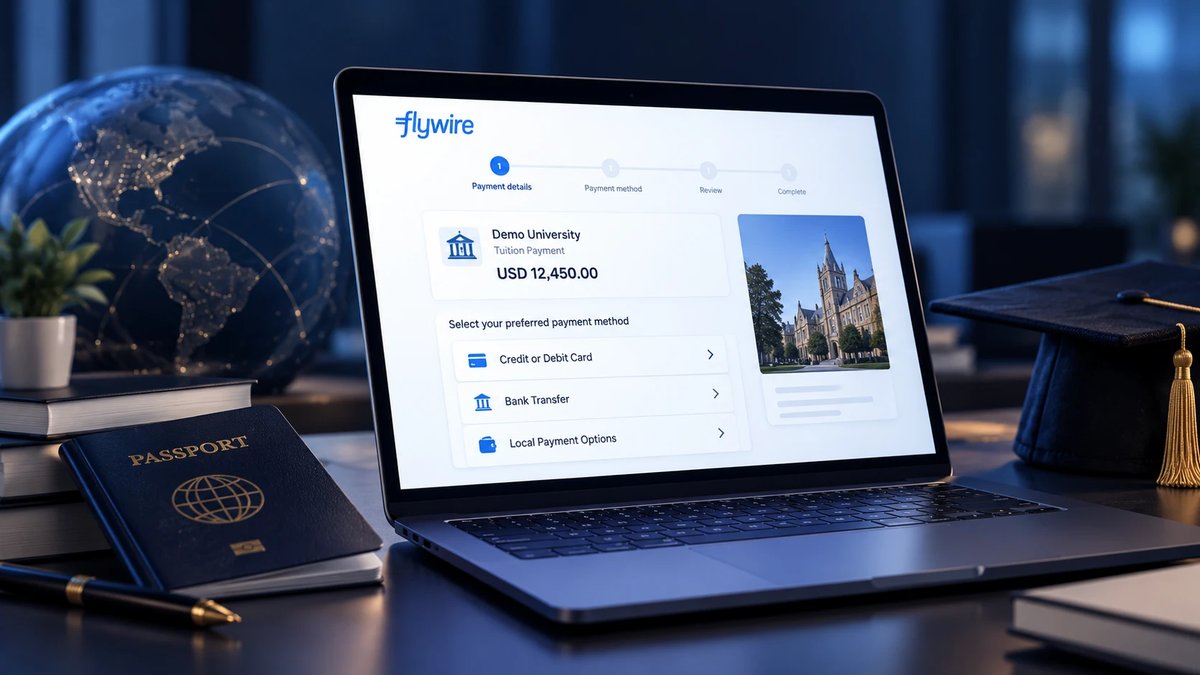
The exact layout differs by institution and changes over time, and the image above is an illustration rather than the real interface. But these six things you will see, or be asked for, on any Flywire page:
Amount and currency
The amount the university asked for is in the university's currency; what you pay may be shown in a local currency. Flywire says it shows the total amount due before you confirm. Compare that number with the figure in the university's letter rather than assuming they match.
Payment reference
The page asks for whatever the university has specified: usually a student ID or an invoice number. That reference is what ties the money to your file. Copy it exactly from the university's letter and keep a note of it — any other payment route will need the same thing.
Credit or debit card
You enter the card on the page and the payment is booked there. Flywire lists cards among its recommended methods. For a payment connected to Iran the question is not which card to pick; the “Paying from Iran” section below explains.
Bank transfer
Instead of taking the money, this option gives you instructions: the amount, the currency, the receiving bank's details, and the reference to write on the transfer. You make the transfer from your own bank. Flywire says that once it has received the transfer, a further 2–3 days should be expected for delivery to the institution. Write the reference exactly as shown so the money is matched to your payment.
Local payment options
Depending on the payer's country, you may see e-wallets or local methods such as Alipay, PayPal, Apple Pay or Google Pay. Flywire's own guidance recommends cards, local methods and bank transfers, and specifically does not recommend international wire transfers or money orders.
Tracking link and receipt
After booking you get an email with a tracking link that stays active for 90 days and shows the payment's status from start to delivery. The receipt can be downloaded from that tracking page, from a Flywire account, or from the delivery email. That receipt is your record; keep it.
Card, bank transfer, or a local method?
They differ in where the money is taken from you and what you are left holding:
| Compare | Card | Bank transfer | Local method |
|---|---|---|---|
| Where the payment happens | On the Flywire page itself | From your own bank, per the instructions | In the local app or service, such as an e-wallet |
| What you are left holding | An email with the tracking link, then the receipt | The transfer instructions (amount, currency, receiving bank, reference) plus the tracking link | The local service's confirmation plus the tracking link |
| Timing Flywire states | None stated; don't assume | Once Flywire receives the transfer, a further 2–3 days to reach the institution | None stated; depends on the method |
| Where people slip | Typing the reference or amount from memory instead of the university's letter | A reference written incompletely, or an amount different from the instructions | A method not offered for the payer's country |
Once a payment shows “Delivered”, Flywire's help center says to allow 2–3 business days for it to appear in the student account. Flywire gives that window separately from the bank-transfer one; if the university's deadline is close, leave more slack than either.
“Delivered” does not mean “posted to the student account”
On the tracking page, “Delivered” means Flywire has sent the payment to the university's bank account. Flywire's part is done — it does not necessarily mean the university has posted it to your file yet. If you still see nothing in the student account after those 2–3 business days, go to the university's finance office with the receipt and the payment reference; they are the ones who match the payment to the file.
Paying from Iran: the honest answer
Flywire is a U.S.-domiciled company, and its own sanctions-screening document says it must comply with the economic sanctions administered by OFAC (the U.S. Treasury's sanctions office) regardless of where the institution or the payer is located. The same document lists Iran — alongside Cuba, North Korea and certain territories in Ukraine — among the jurisdictions under comprehensive sanctions, and says Flywire is generally prohibited from facilitating transactions that may be connected to them.
Screening happens in real time at the moment of payment and, according to Flywire, typically covers names, addresses and geographical references. In some cases a payer is asked, after starting the payment, for a government-issued ID, date of birth and country of residence. Flywire's partner banks run their own screening as well.
In plain terms: don't expect this page to accept a payment connected to Iran — that is the company's stated position, not a glitch that a different card will fix.
Only true details go on this page
This page checks who is paying and from where, so there is only one honest way to fill it in: with true details. Don't enter a name, address or country that isn't the payer's, and don't use someone else's identity or address — a payment booked on false information becomes a problem at screening or afterwards, and the file behind it is your academic file. If, after you start, you're asked for ID, a date of birth or a country of residence, answer truthfully — or stop and ask the university's finance office what to do.
What to do next
The university chose Flywire, so the answer to “how do I pay, then?” also sits with the university. Work through it in this order:
- 1Ask the university's finance or student-accounts office which payment methods it accepts from you.
- 2Get the details in writing: the amount and currency, the deadline, and the reference that has to travel with the payment.
Whatever route the tuition eventually takes, carry these three things off this page:
The payment reference, exactly
The same student ID or invoice number the page asks for. Without it, a payment does not land on your file.
The amount in the university's currency
The figure in the university's letter, in the university's own currency — not a converted equivalent some page shows.
The deadline
The date the university gave, plus the days each method needs to arrive and be posted.
The wider picture — why tuition is hard to pay from Iran, why the refund policy belongs to the university, and what to ask of any intermediary — is in our university tuition guide.
Frequently asked questions
Is the Flywire link my university sent genuine?
Flywire is a company that education institutions use to collect payments from other countries, so seeing its name on the page is not unusual in itself. But you can't tell from the page alone: open the link only from the university's own email or portal, and check that the page names your institution. If in doubt, ask the university's finance office before paying.
Do I pay in the university's currency or my own?
The university sets the amount in its own currency; Flywire says a payer can pay in a local currency through local methods. The total amount due is shown before you confirm; compare it with the figure in the university's letter.
Does “Delivered” mean the money is on my file?
Not necessarily. “Delivered” means Flywire has sent the payment to the university's bank account. Flywire says to allow 2–3 business days for it to appear in the student account; matching it to your file is the university's job.
Where do I get the payment receipt?
From the tracking page whose link was emailed to you (active for 90 days), from a Flywire account, or from the delivery email. Any follow-up with the university will need that receipt and the payment reference.
Can I pay on Flywire with an Iranian card?
According to Flywire's own sanctions-screening document, no: it lists Iran among the jurisdictions under comprehensive sanctions and says the company is generally prohibited from facilitating transactions connected to them; screening is real-time and based on names, addresses and geographical references. That is stated policy, not a temporary error, and ways around it are not the subject of this article.
What if the page asks for ID or a date of birth?
Flywire's own document says a payer may sometimes be asked for more information after starting a payment — which may include a government-issued ID, a date of birth and a country of residence. Give true details only; if you are unsure, stop there and ask the university's finance office.
How much does Flywire charge?
The public Flywire pages we checked publish no figure for a fee or an exchange-rate margin, so we don't print one. Flywire says it discloses costs and shows the total amount due up front; compare that total with what the university asked for before you confirm.
Is Rima connected to Flywire?
No. Rima has no relationship, contract or integration with Flywire and does not promise that a payment goes through Flywire or any particular processor. What Rima's tuition service commits to is written on the service page.
Have the payment reference?
Enter the university, the payment reference and the student's name; you see the fee and the final total before paying, and the payment receipt is handed to you. If the payment is not made to the university, the full amount comes back.
Pay tuitionRead next
Sources
- Flywire — Understanding the sanctions screening process (PDF)
- Flywire — Education payments
- Flywire — International payments 101
- Flywire Help Center — tracking link, Delivered status, receipts
- OFAC — Office of Foreign Assets Control, U.S. Department of the Treasury
Flywire's pages were checked on September 29, 2026 and may change. Statements attributed to Flywire's help center are paraphrased. Flywire and its marks belong to their owners.